Upgrade, switch or cancel. Whenever you like.
How to upgrade from Free, move between plans or billing periods, cancel, and what happens with payments and refunds.
Payments for Springle go through Paddle, our payment partner. Upgrading starts in Springle; everything about an existing subscription (your card, switching, cancelling) is on Paddle’s page, which Springle opens for you with Manage.
Upgrade from Free
- Open Settings › Plan. You can also choose Upgrade Springle… from the menu bar, Upgrade… from the card’s ⋯ menu, or the button in the card when Springle mentions a limit.
- Pick Yearly (two months free) or Monthly at the top.
- Click Choose Family or Choose Springle. Paddle’s checkout opens in your browser.
- Pay there. Your local price and any tax are shown before you pay.
- Come back to Springle. The plan changes by itself once the payment goes through, and Settings › Plan says Welcome to Springle (or Springle Family).
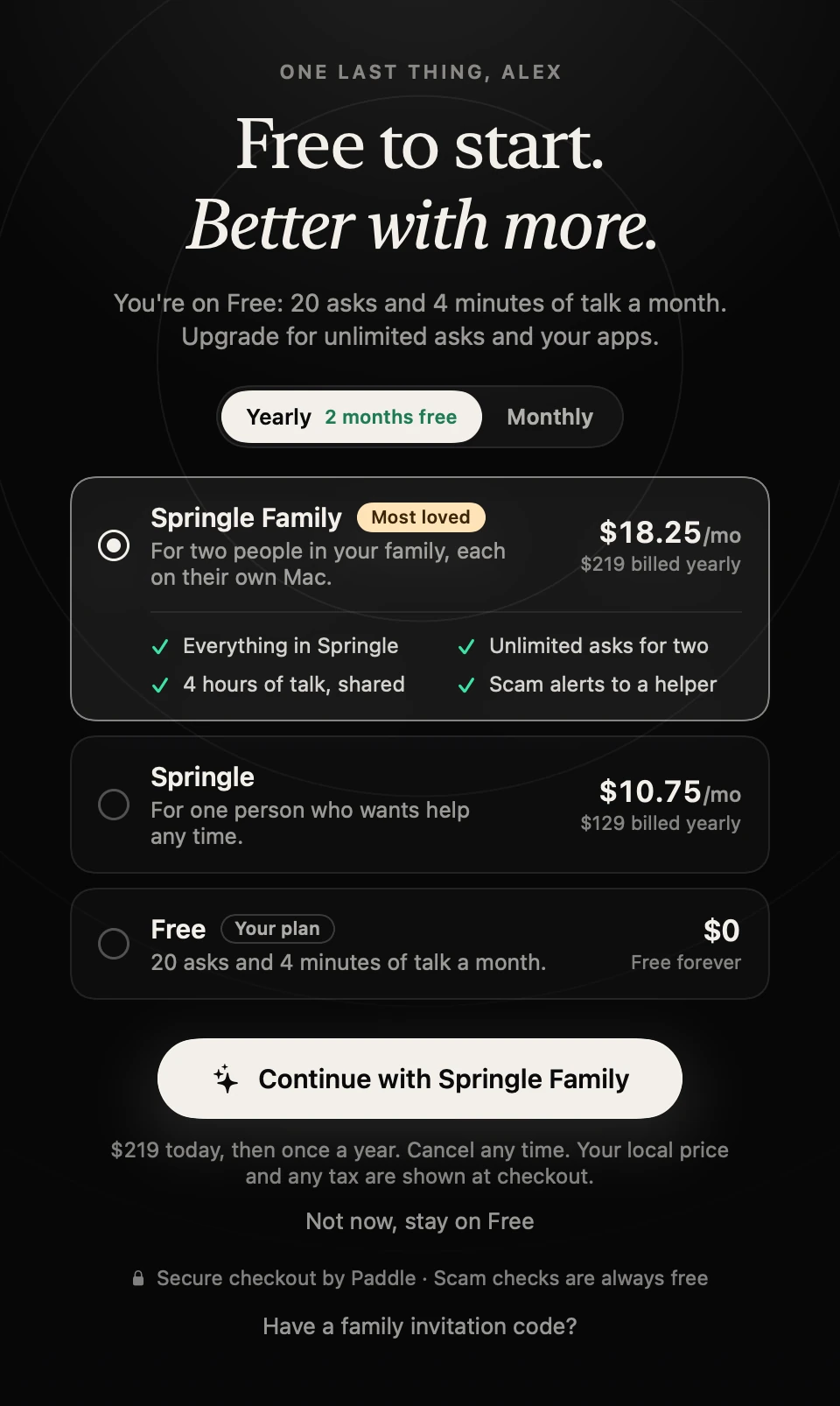
- 1Yearly or Monthly.
- 2Springle Family, Springle and Free, with what each includes.
- 3The button says which plan you’re choosing; the line under it says what you’ll pay today.
- 4Not now, stay on Free closes this without paying.
- 5Have a family invitation code? is for joining someone’s Springle Family.
Paid, but the plan hasn’t changed? Check that Springle is signed in with the same Google account you started checkout from (it’s at the top of Settings › General). If it still doesn’t show up, email support@innoventuresai.com.
Switch plans or billing period
To move between Springle and Springle Family, or between monthly and yearly:
- Open Settings › Plan.
- Click Manage. On the Springle plan, the Switch button next to Springle Family goes to the same place.
- Make the change on Paddle’s page. Paddle shows any amount due before you confirm.
Cancel
- Open Settings › Plan and click Manage, or use the link in your Paddle receipt.
- Cancel on Paddle’s page.
Cancelling stops the next renewal. You keep your plan until the end of the period you’ve already paid for. Settings › Plan then says Ends on that date, You’ll keep the free plan afterwards. After that you’re on Free, and nothing in Springle is deleted: your notebook stays, and apps you connected stay listed so you can disconnect them.
If you have Springle Family, cancelling moves both of you to Free when the period ends.
If a payment doesn’t go through
Settings › Plan shows Your last payment didn’t go through. Update your card in Manage to keep your plan. You keep your plan for 7 days while Paddle tries again. Click Manage to update your payment details. After 7 days without payment, the account moves to Free until it’s paid.
Receipts and refunds
Paddle sends your receipts and handles billing questions. Under Springle’s Terms:
- Payments aren’t refundable, and there are no refunds for partly used periods or unused allowances, except where the law says otherwise.
- If you’re in the EU, EEA or UK, you may have the right to cancel within 14 days of buying. Paddle handles these requests.
- To ask for a refund, contact Paddle through your receipt, or email support@innoventuresai.com and we’ll help.
Deleting your account
A plan that would renew needs cancelling first. If you try to delete your account with one, Springle says Cancel your plan first and offers Manage Plan. See Your account.
Did this help?