Running low? You can keep going.
What happens when your talk time or free asks run low or run out, how talk top-ups work, and when everything comes back.
Springle never stops in the middle of something because of your plan. It gives you a heads-up as you get close to a limit, finishes what it’s doing when you reach one, and tells you how to carry on.
A heads-up near the limit
Once about 80% of an allowance is gone, Springle mentions it with one quiet line in the card:
- Talk time, as a spoken conversation starts: About 2 min of talk time left this month, with Add 2 hours.
- Free asks, as you ask: 3 free asks left this month, then This is your last free ask this month, with See plans.
The line never opens the card by itself, and you can close it.
When talk time runs out mid-conversation
Springle says That’s this month’s talk time used up. I’ll finish what we’re doing. It finishes the task in hand, then ends the conversation at the next quiet moment. After that, the island reminds you how to keep going.
You can keep asking by voice. Hold ⌃ control ⌥ option while you speak, then let go. That counts as an ask, never as talk time. See Hold to talk.
If you start a spoken conversation with no talk time left, Springle opens a typing conversation instead and says why. You can type, or hold ⌃⌥ to speak.
When free asks run out
On the Free plan, once your 20 asks are used, Springle says That’s all 20 free asks for this month and the day they come back, with See plans in the card. Scam checks keep working: if something looks wrong, ask.
Check where you stand
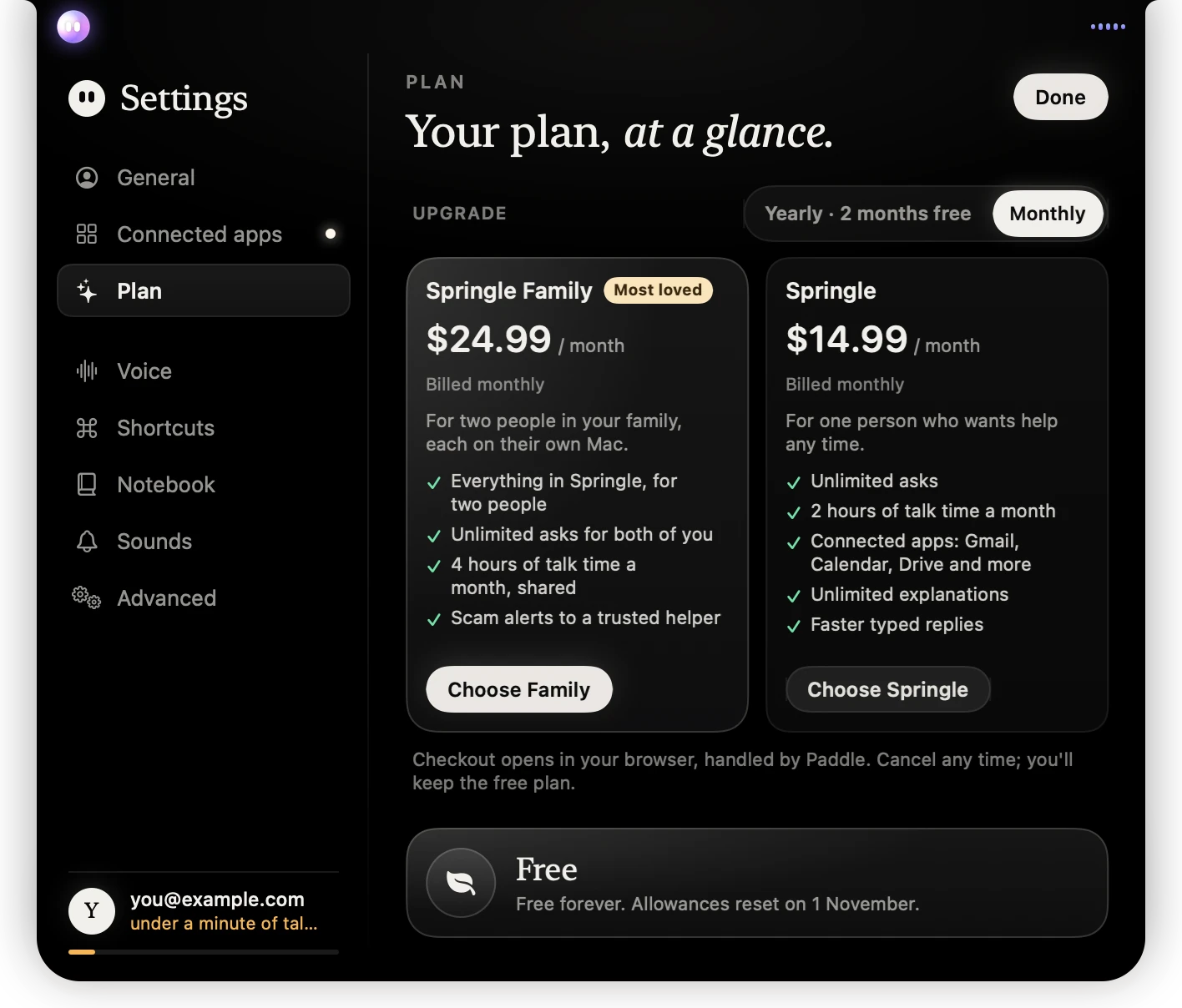
- 1The foot of the Settings sidebar shows the talk time you have left, in amber when it’s nearly gone.
- 2The plans you can move to, monthly or yearly.
- 3The day your Free allowances come back.
Settings › Plan shows this month’s asks, talk time and explanations, and when they reset. See Plans and prices.
Talk top-ups
A talk top-up adds 2 hours of talk time for $9.99. It works on any plan, Free included.
- Open Settings › Plan.
- Next to Add 2 hours of talk time, click Add. You can also click Add 2 hours in the card when Springle says you’re running low.
- Pay on Paddle’s checkout page in your browser. The hours appear in Springle once the payment goes through.
How top-up hours are used:
- They’re only used once the month’s talk time is gone.
- They never expire, so hours you don’t use stay for later months.
- In Settings › Plan, the talk time line shows them as plus 2 h bought.
- On Springle Family, each person uses their own bought hours first, then the owner’s.
When everything comes back
Asks, talk time and explanations reset on the 1st of each month (UTC), on monthly and yearly plans alike. What you don’t use doesn’t roll over to the next month. Bought top-up hours are the exception: they carry over until you use them.
Want more every month instead? Springle has 2 hours of talk time a month and unlimited asks; Springle Family has 4 hours, shared. See Upgrade, switch or cancel.
Did this help?