Say “remind me to…” and let it go.
Say or type "remind me to…" with a time. Springle keeps the name, number and page you’ll need, and the reminder drops down from the island when it’s due.
Ask Springle to remind you of something, the way you’d ask a person. When it’s due, the reminder drops down from the island with what you need to act on it: the number to call, the page you were on, or the steps you kept.
Set a reminder
Hold ⌃ control ⌥ option and say it, or type it to Springle.
Remind me to call the surgery tomorrow at 9
Remind me to put the bins out every Sunday at 7 pm
Remind me to cancel this before it charges me
Remind me when I’m back at my Mac
Springle works out the time on your Mac, with fixed rules, so the same words always mean the same time. It says the time back in full, like "Tomorrow, Saturday 3 Oct · 9:00 am", and the card shows Reminder set with the day and time. Tap it to see the reminder in your notebook.
A day without a time ("on Tuesday") means the whole day. If a time could mean two things, like "at 7", Springle asks which, and the card shows both as buttons: "This evening, 7 pm" and "Tomorrow, 7 am".
Repeating reminders
Say how often in the same sentence: "every day", "every weekday", "every Thursday", "every month", "every year". The reminder comes back each time until you delete it, and its card says how often, such as "Every month on the 2nd".
From the notebook
On the Today tab, the box at the bottom says "Remind me to…". On other tabs, type a note with a day or time in it. Either way, the time becomes an amber chip before you keep it.
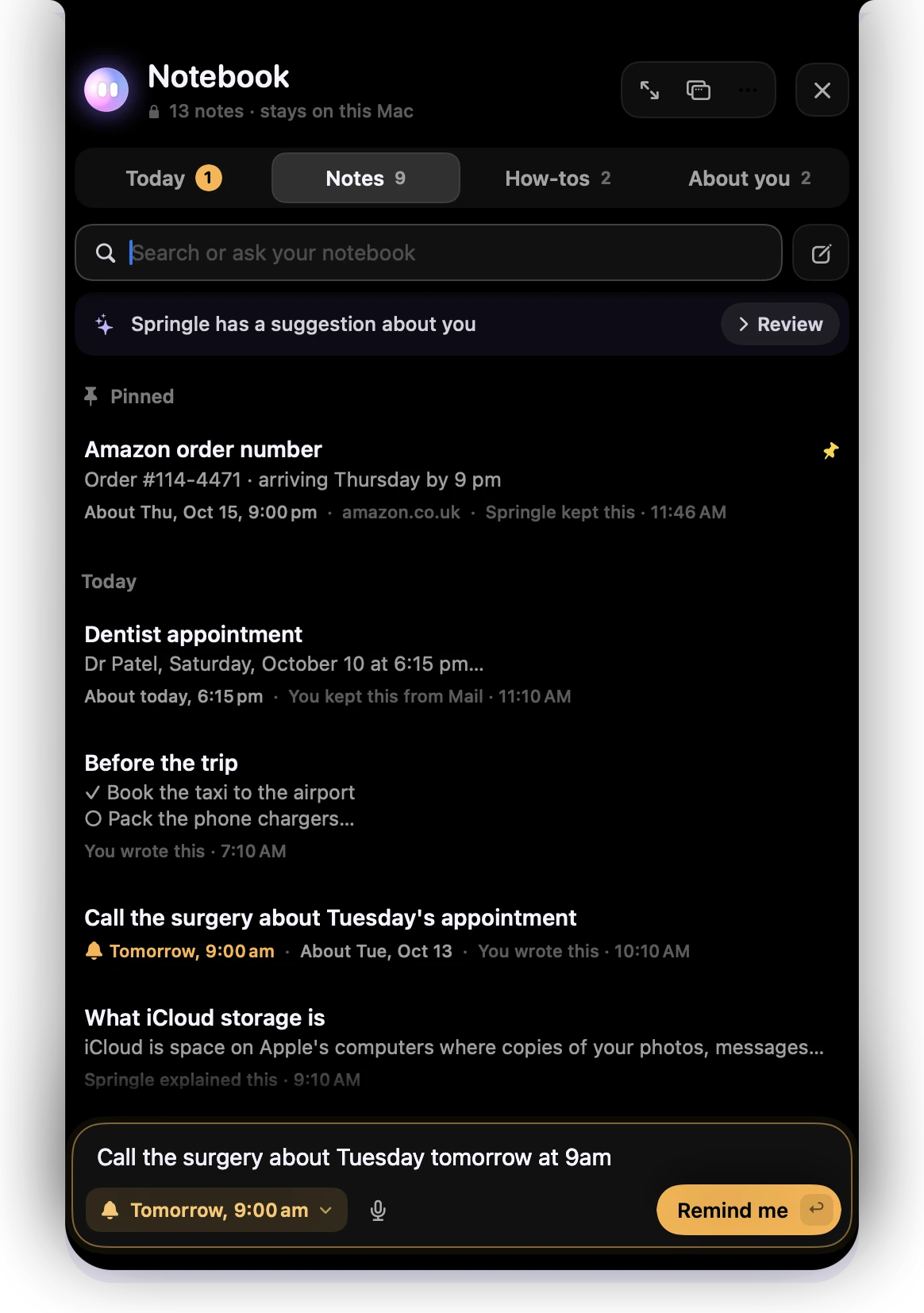
- 1What you typed, with a day and time in it.
- 2The time Springle read from your words. Check it here. Click it to keep a plain note instead.
- 3Remind me keeps it as a reminder.
Any note can become a reminder too. Open it and choose Remind me above it, or type / on an empty line in it and choose Remind me about this…. Each choice shows the time it means, and once it’s set you can make it Repeat every day, week or month.
Reminders about a web page
Ask while you’re looking at something: "remind me to call these guys tomorrow", or "remind me to book this next week". Springle keeps the real name, the phone number and the page, so the reminder still makes sense when the page is long gone.
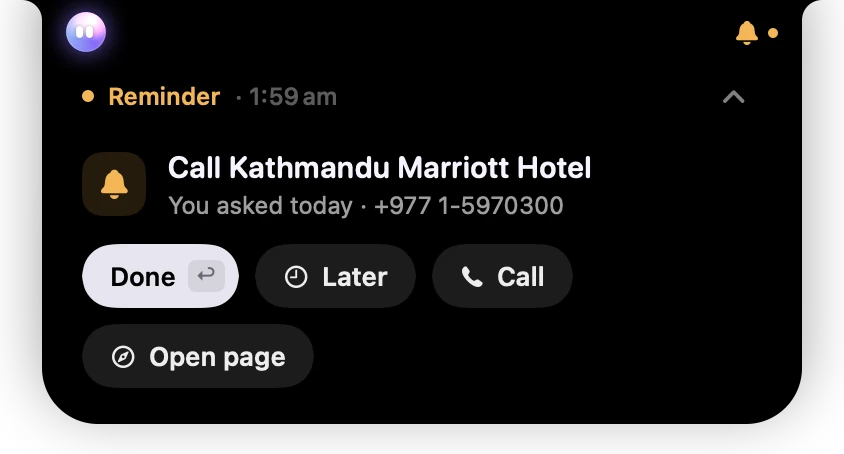
- 1The real name of the place, not "these guys".
- 2When you asked, and the number Springle kept from the page.
- 3Call the number.
- 4Open page goes back to the page you were on.
Because the number came from a web page, Springle checks with you once more before calling it.
Even if you only say "these guys" or "this place", Springle names them from what’s on screen before it keeps the reminder, so you won’t be left wondering who "these guys" were.
When a reminder goes off
The card drops down from the island with a soft chime. After a few seconds it folds back into an amber bell, which waits beside the island until you deal with it.
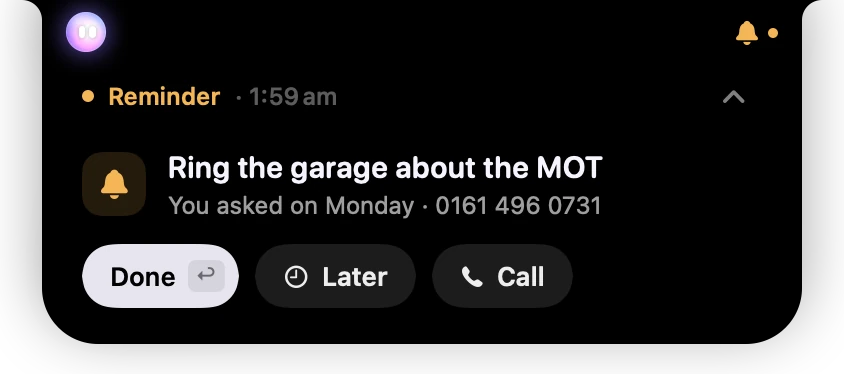
- 1Reminder and the time it was due, in amber because it needs you.
- 2The arrow folds the card away. The reminder waits as the bell.
- 3What to do, when you asked, and the number kept with it.
- 4Done (return) ticks it off.
- 5Later puts it off. Call is there because the reminder has a phone number in it.
- Done ticks it off. A repeating reminder comes back next time.
- Later offers choices like In 10 minutes, In an hour, This evening and Tomorrow morning, each with the exact time. It also has When I’m back at my Mac and Pick a time….
- Call, Map, Open or Open page show when the reminder has a number, an address or a link in it.
Folding the card, with the arrow at its top right or esc, leaves the reminder waiting as the bell.

- 1The amber bell and dot: a reminder is waiting. Point at it to see it.
When Springle holds it back
A reminder never interrupts while Springle is helping you, while another app is using the microphone (you’re on a call), or while something is full screen. It waits as the bell and drops down at the next quiet moment. Several at once arrive as one list.
If your Mac was asleep or locked, what went off while you were away shows once when you’re back, under "While you were away". Reminders set for "when I’m back at my Mac" go off then too.
If Springle isn’t running when a reminder is due, macOS shows it as a notification instead.
A reminder with a how-to behind it
If you kept a how-to for the job, the reminder brings it along.
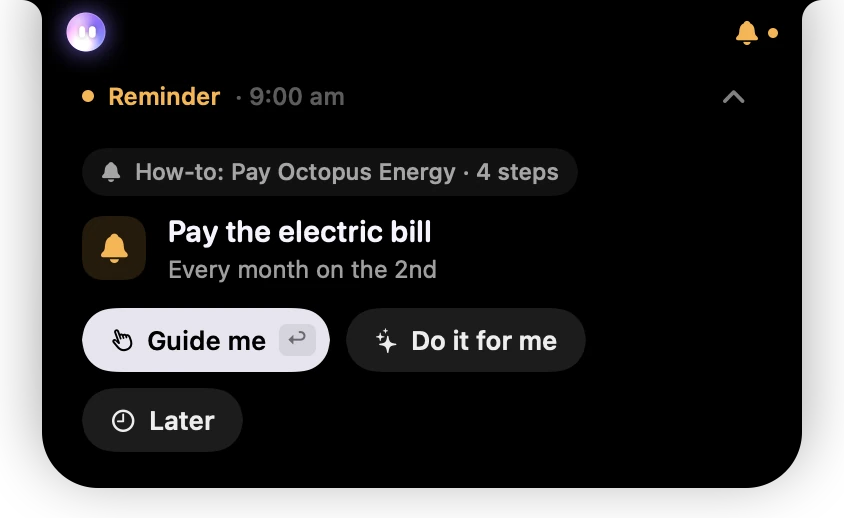
- 1The how-to that goes with this reminder, and how many steps it has.
- 2The reminder, and how often it comes back.
- 3Guide me walks you through the steps. return does the same.
- 4Do it for me has Springle do the steps.
- 5Later puts it off.
Done is there too. Starting Guide me or Do it for me counts as doing it, so the reminder is ticked off. The task starts with the how-to’s steps, and the card says where it came from.
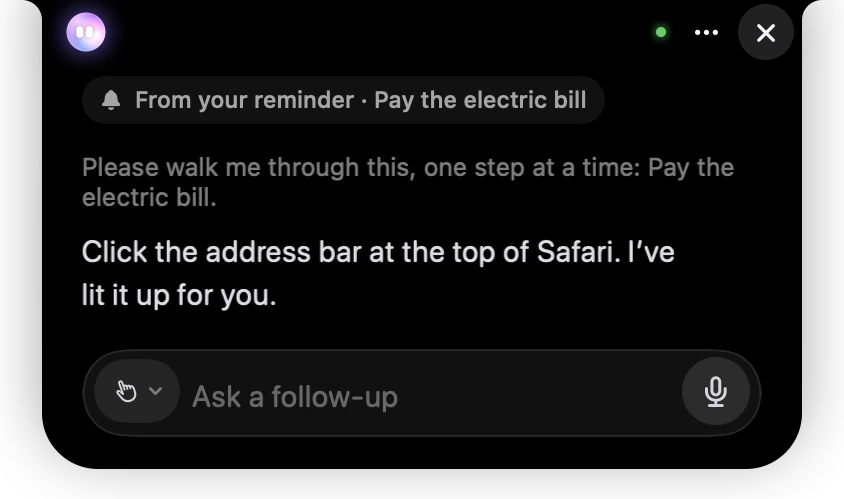
- 1Where the task came from: your reminder.
- 2What the reminder asked Springle to do.
- 3The first step of the how-to: Springle says what to click, and lights it up.
- 4The hand: Springle is guiding you, and you do the clicking.
See Your turn for how guided steps work.
Hear reminders read aloud
Turn on Settings › Notebook › Read reminders aloud. Each reminder is also said in the Mac’s own voice as it goes off. It’s off by default.
Get reminders on your iPhone
Turn on Settings › Notebook › Copy reminders to my iPhone. Springle asks for access to Reminders, then keeps a list called Springle in the Reminders app, so your reminders reach your iPhone and Apple Watch.
- Ticking one off on your iPhone ticks it off in Springle too.
- If the words differ, Springle’s notebook wins, so change a reminder’s words in Springle.
- Deleting a reminder in Springle removes its copy.
See what’s coming. The notebook’s Today tab shows reminders waiting for you under Needs you, then today’s and the next week’s in time order. See Today.
Change or delete a reminder
Open it in the notebook. Remind me changes the time or how often it repeats. More › Move to Trash deletes it, with Undo for six seconds.
Did this help?