It knows what you told it, and nothing else.
Springle remembers the facts you chose to keep and your birthday from setup. They’re all on the About you page, where you can change or remove any of them.
Springle doesn’t quietly build up a picture of you. It knows two things about you: the birthday you gave at setup, and the facts you chose to keep. Both are on one page in the notebook, About you, and Springle knows them in every conversation, spoken or typed.
See what it knows
Open the notebook with ⌃ control ⌥ option N and choose About you, or press ⌘ command 4.
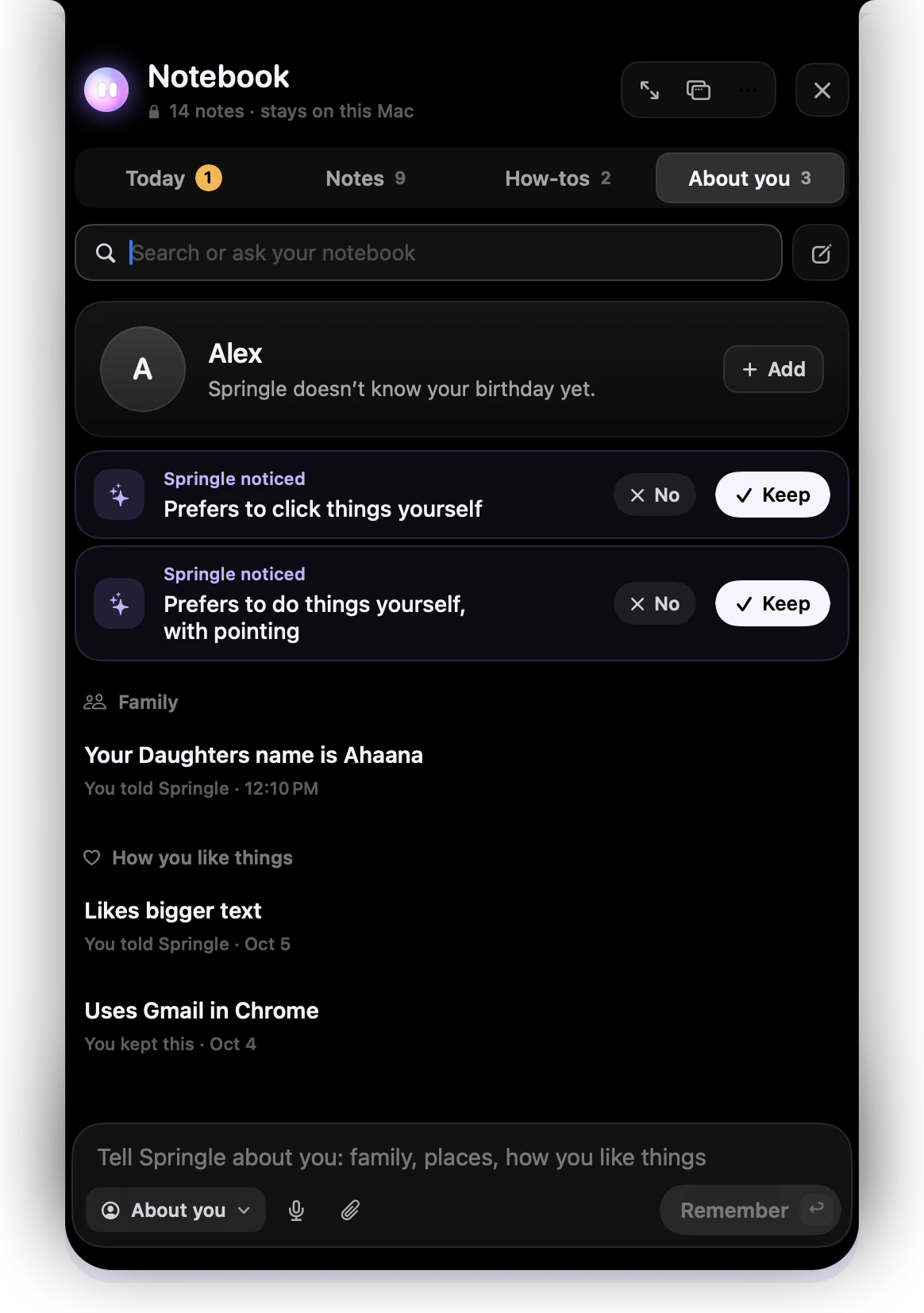
- 1About you: everything Springle knows about you is on this page.
- 2A suggestion from Springle. It doesn’t count until you keep it.
- 3Keep or No. Only what you keep reaches Springle.
- 4The facts you kept, in groups, each with who told Springle and when.
- 5Type a fact here and press Remember.
Each fact says where it came from: "You told Springle", or "You kept this" for a suggestion you accepted.
Your birthday from setup has its own row here too, marked "From setup". If it’s wrong, tell Springle the right day and it will remember that instead.
Tell Springle to remember something
Say or type it in your own words:
Remember that my sister is called Asha
Remember I prefer bigger text
From now on, I use Gmail in Chrome
Springle keeps it straight away in About you, and the card says Remembered about you. A fact you ask it to remember stays until you remove it. It isn’t tidied away like an old clip.
If a fact changes ("actually, my sister’s number changed"), Springle updates the one it has, so there’s only ever one, and the card says Updated in About you. The earlier version stays in the fact’s history.
You can also type a fact into the box at the bottom of About you and press Remember.
Only your own words count. Something written on a web page or an email can never make Springle remember a thing about you. If a fact came from the screen, Springle asks you first.
"Remember this about you?"
Now and then, Springle may notice something about how you use your Mac, like "Uses Gmail in Chrome", and ask whether to remember it. The card shows Remember this about you? with the fact, and Keep and No.
- It asks about one thing per conversation at most, and only about how you use your computer.
- It counts only once you keep it. Until then it never reaches Springle.
- If you don’t answer in the card, the suggestion waits in your notebook for a week. A line in Notes says "Springle has a suggestion about you", and Review takes you to it.
How Springle uses it
What you kept goes into every conversation, typed or spoken. Up to 40 facts go along, pinned ones and the ones used most first. Springle uses them to pitch answers at the right level, and to answer questions about you ("when is my birthday?") from what you told it, never from someone else’s event or message.
Fuller answers from Go deeper, and explanations in the notebook, are sent with the facts you kept, so they’re pitched to you. See Keep and Go deeper.
Answer questions from my notes
When you ask your notebook a question, Springle can answer from your notes. With Answer questions from my notes on (Settings › Notebook, on by default), the few notes that match go to the explaining model with your question, and the answer shows which notes it used. Turn it off and Springle only searches your notes on this Mac and lists the matches.
Change or remove a fact
In About you, open the fact.
- To change it, click its words, or the details under them, and type. It saves itself. Your version wins: Springle never rewrites it.
- More › Move to Trash removes it. Undo shows for six seconds.
Or say it:
Forget which bank I’m with
Forget my sister’s number
Springle moves that fact to the Trash and the card says Forgotten. If two facts fit what you said, it asks which one. Only your own words can make it forget something.
Your birthday comes from your account, not the notebook, so it can’t be forgotten this way. Tell Springle the right date and that’s the one it uses.
Is it still true?
Every couple of months, the notebook checks one fact with you: Yes, still true or Not any more. Choosing Not any more moves it to the Trash.
Springle never keeps passwords, card numbers, PINs, one-time codes or ID numbers, even if you ask. It suggests the Passwords app instead.
To clear everything at once, see Forget everything.
Did this help?