Your day, at a glance.
Today in the notebook puts your reminders and your calendar in one list. Before a meeting, the island counts down and offers Join.
Today is the first tab in the notebook. It brings together what needs you now, the rest of your day in time order, and the week ahead. When a meeting is close, the island shows a countdown, and Join takes you straight in.
Open Today
Press ⌃ control ⌥ option N to open the notebook, then choose Today, or press ⌘ command 1. The amber number on the tab is how many reminders have gone off and are waiting for you.
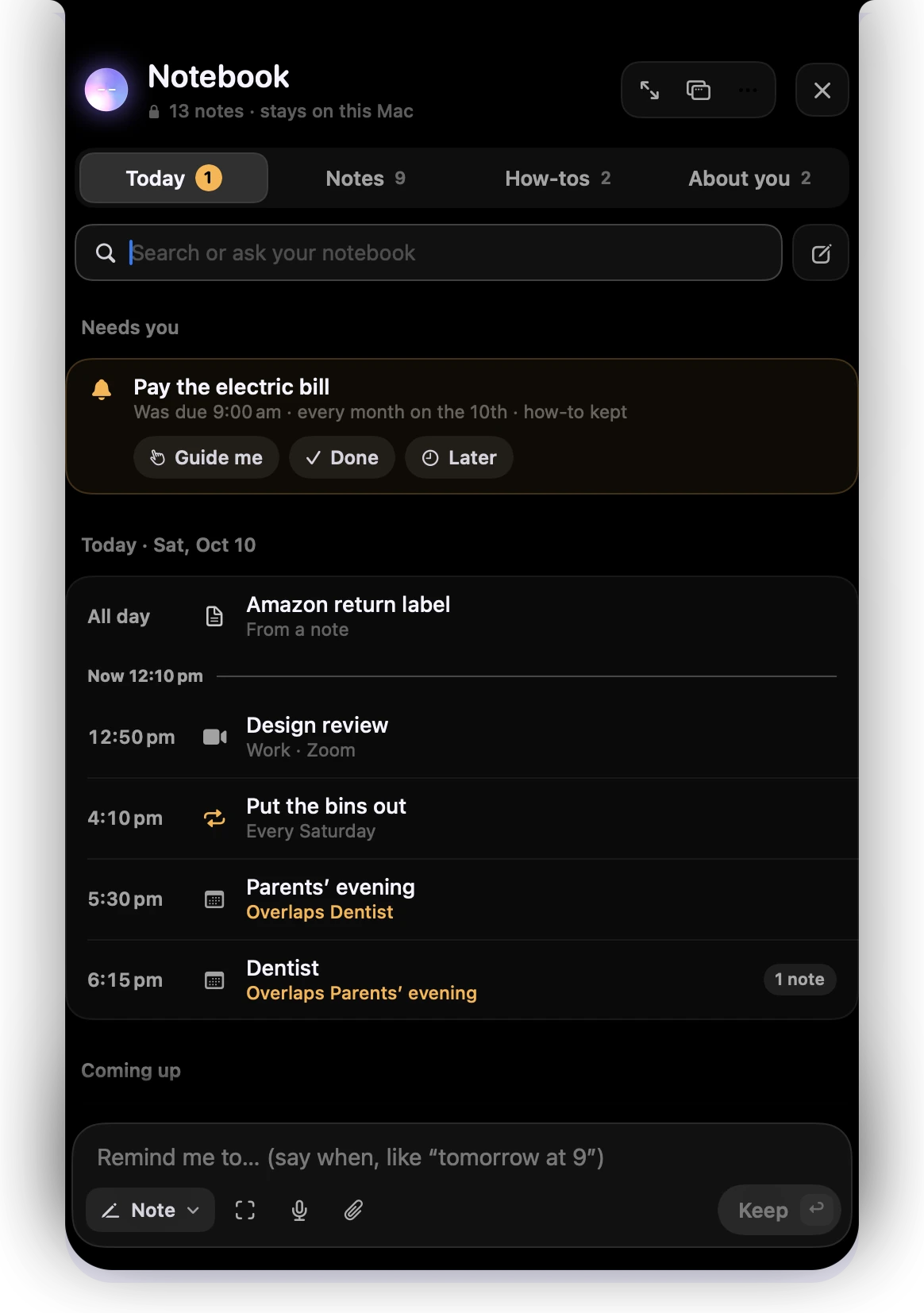
- 1Today, with the number of reminders waiting for you.
- 2Needs you: a reminder that went off, with Guide me, Done and Later.
- 3Your day in time order, with a line for now.
- 4Two events at the same time are marked in amber: "Overlaps Dentist".
- 5"1 note" means you have a note that goes with this event.
- 6Coming up: reminders and events in the next week.
- 7The box at the bottom says "Remind me to…" on this tab.
What’s in it
- Needs you: reminders that went off and haven’t been dealt with. Guide me shows when there’s a how-to behind one.
- Today: events from your Calendar app, your reminders, and notes about today, in time order. Events that overlap say so in amber.
- Coming up: the same for the next seven days.
Your calendar is read on this Mac and is never copied into the notebook. Springle shows whatever calendars the Calendar app has: iCloud, Google, Exchange or others you’ve added there.
Open an event
Choose an event to see it in full. Depending on the event you’ll see:
- Join with the meeting’s app name, when it has a Zoom, Google Meet, Teams, Webex or FaceTime link.
- Prep me: Springle helps you get ready, from the invite and anything in your notebook about it.
- Remind me: 10 minutes before, 30 minutes before, an hour before, or that morning.
- Open in Calendar.
- Notes that go with it, and Write a note for this meeting.
Let Springle see your calendar
Today needs permission to read the Calendar app. Until you give it, Today shows a row that says "See your calendar here too", with Show my calendar.
- Choose Show my calendar in Today, or go to Settings › Notebook › Calendar and choose Allow.
- macOS asks whether Springle may see your calendars. Allow it.
- Your events appear in Today and the island.
Once it’s allowed, Settings › Notebook lists each of your calendars with a switch, so you can hide the ones you don’t want in Today and the island.
Refused it by mistake? Settings › Notebook › Calendar shows Open Settings, which takes you to System Settings › Privacy & Security › Calendars. Turn Springle on there. If Springle can only add events and not see them, it says so in the same place.
You can also ask about your time while you talk or type:
What’s on today?
Am I free on Thursday afternoon?
Move my dentist to Friday at 10
Springle always asks before it adds, moves or deletes an event, and says the whole date back to you.
The meeting countdown
In the last ten minutes before an event with a time, the folded island shows a camera (or a calendar, when there’s no call link) and the minutes left, in its right-hand side.

- 1The camera means the meeting has a call link. "9m" is the minutes until it starts.
Point at the countdown to see the meeting.
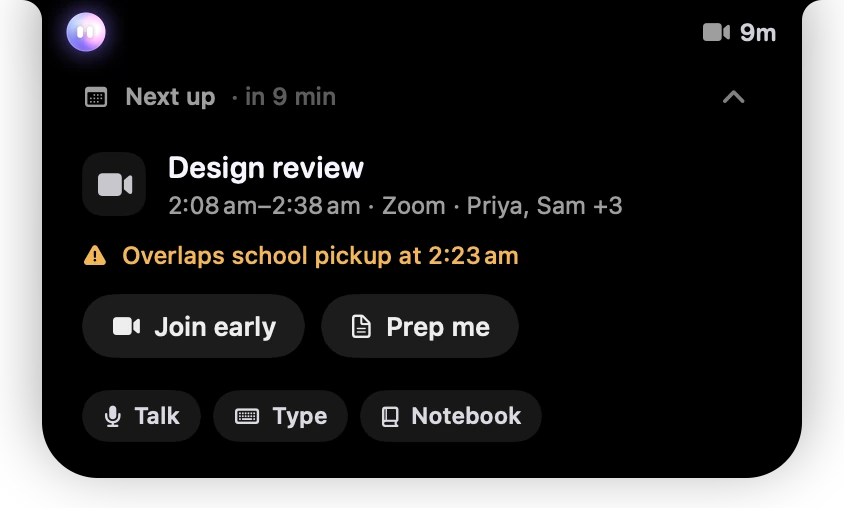
- 1Next up, and how long until it starts.
- 2The meeting: its time, how you join, and who’s invited.
- 3If it overlaps something else, the clash is in amber.
- 4Join early opens the call link now. Prep me helps you get ready.
When the meeting starts
At the start time, the card drops down from the island with Starting now in amber.
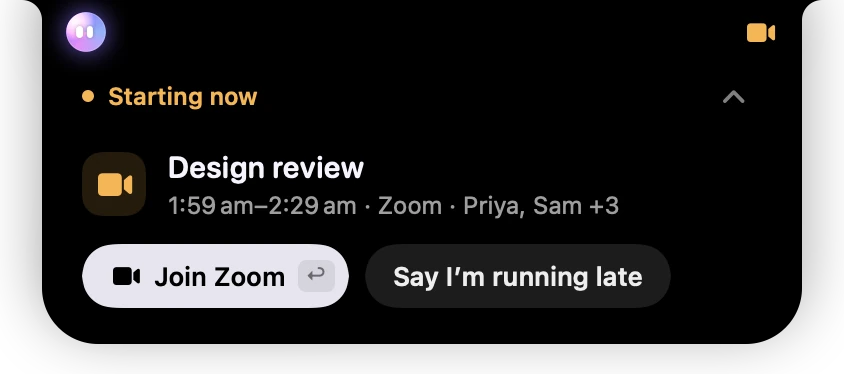
- 1Starting now, in amber because it needs you.
- 2The meeting, its time and who’s in it.
- 3Join Zoom opens the call. return does the same.
- 4Say I’m running late helps you tell the others. It asks you before anything is sent.
Say I’m running late shows only when other people are invited. Dismiss puts the card away.
Springle doesn’t drop down while it’s helping you, while another app is using the microphone (you’re on a call), or while something is full screen. The meeting waits on the island until the moment is quieter. If you’re away from your Mac, it’s listed under "While you were away" when you come back.
Turn the countdown off
Go to Settings › Notebook › Reminders & calendar and turn off Show my next meeting on the island. It’s on by default. Turned off, the island shows neither the countdown nor the meeting starting. Your events still show in Today.
All-day events never get a countdown.
Did this help?