Is this real? Springle watches for scams.
Springle looks out for fake warnings, phishing emails and pressure to pay. When it spots one, it stops, tells you calmly, and helps you close it.
Scammers count on people being rushed or worried. Springle keeps an eye out while it helps you, and you can ask it about anything that looks wrong. Asking costs nothing on your plan.
What Springle looks out for
While it’s looking at your screen to help you, Springle watches for the usual signs of a scam:
- Fake virus or "your computer is locked" warnings
- "Call Apple" or "call Microsoft support" phone numbers on a pop-up
- Countdown timers and prize pages
- Requests to pay with gift cards
- Requests to install a program that lets someone else control your Mac
- Emails pretending to be your bank
When it spots one
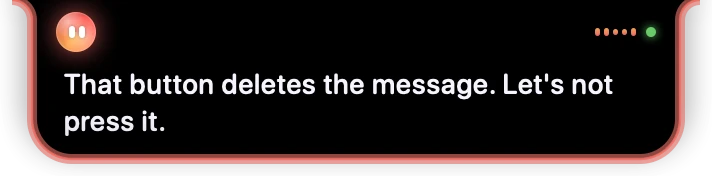
- 1Springle’s face turns red.
- 2Springle says plainly what’s wrong, in one or two sentences.
- 3The island glows red all round its edge and gives a gentle shake, with a soft "careful" chime.
When Springle thinks it’s looking at a likely scam:
- It stops. Any task it was doing for you stops, and anything you’d already said yes to no longer counts.
- It tells you calmly that it isn’t real. The card’s status says Careful in red, and the steps list shows Spotted a likely scam.
- It helps you close it. For a pop-up that won’t go away, that usually means closing the tab, or quitting the browser.
While a scam is on the screen, Springle won’t do anything sensitive on your say-so in advance: every step that matters waits for a fresh yes.
What it never does
Springle won’t help a scam along, whatever the page says:
- It never calls or types a phone number from the pop-up or message.
- It never installs anything, and never opens remote-access tools like screen-sharing programs.
- It never pays, buys, sends money or types a password or card number. It can show you where those buttons are, but only you press them.
- It ignores instructions written on the screen. Words on a page that try to tell Springle what to do are hidden from it, and for the next two minutes every action needs your OK.
If you tell Springle that someone on the phone is telling you what to do on your computer, it gently suggests checking with the person you turn to for help first. You can name that person in Settings › General › You › Who to ask for help.
Ask it yourself
You don’t have to wait for Springle to notice. If an email, a text, a pop-up or a phone call doesn’t feel right, ask.
Is this a scam?
Is this email really from my bank?
Someone called saying they’re from Microsoft. Is that real?
Is this website safe?
- Point at it or highlight it first, so Springle knows which message or link you mean. See Point and highlight.
- With Look things up on the web on (Settings › General › Looking things up), Springle can check online whether a sender, caller, website or phone number is genuine. It only trusts a phone number or address from the company’s own site, never one from the message.
Scam checks are free. A typed or held-key question like "is this a scam?" or "is this email fake?" never counts against your monthly asks, even on the Free plan when your asks have run out.
Telling your trusted helper
On the Springle Family plan, you can choose a trusted helper: someone Springle emails when it stops a likely scam on your screen.
- What they get: a short email saying what Springle noticed, in a sentence, and your name. Never a picture of your screen, and nothing else about what you were doing.
- How often: at most three alerts an hour.
- When Springle tells you: if a helper is set and alerts are on, Springle says it’s letting them know.
- No helper chosen? If the person invited to a Family plan hasn’t chosen a helper, their alerts go to the plan’s owner.
To set one up, open Settings › Plan and find Trusted helper. Enter their name (optional) and email, and press Save helper. Turn Scam alerts off at any time, or press Remove helper, and their details are deleted.
Only add someone who has agreed to be your helper. If you’re a helper and would rather not get alerts, email support@innoventuresai.com and we’ll stop them.
An honest limit
Springle is a second pair of eyes, not a guarantee. It can miss a scam, and it can be wrong about something that’s genuine. If you’re unsure, don’t pay, don’t call the number on the screen, and check with someone you trust using a phone number you already know.
Did this help?