Hello again. Every time you’re back.
When you come back to your Mac, Springle says hello on the island, and now and then it waves. What you’ll see, when it stays quiet, and how to change it.
When you come back to your Mac after a while, the island says hello for a few seconds, then folds back into the notch. Now and then during the day, Springle’s face peeks out and waves. It’s a small reminder that Springle is there whenever you need it. It never asks you anything, and it makes no sound.
The first hello of the day
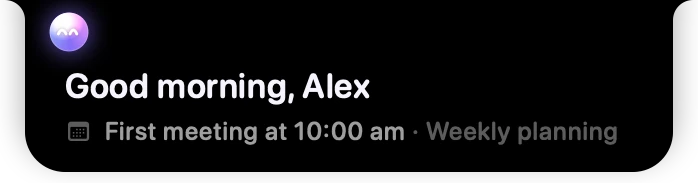
- 1Springle’s face hops and smiles as it says hello.
- 2The greeting. It’s different most days, and uses your name now and then.
- 3One useful line: your next meeting, reminders later today, or the keys to ask.
The first time you’re back each day (you log in, unlock after a night away, or come back after four hours or more), a small card drops under the island for about five seconds. Under the greeting there’s one line from your day:
- Your next meeting today, if you see meetings on the island (Settings › Notebook).
- Otherwise, how many reminders are still to come today.
- Otherwise, while you’re still learning them, the keys to ask: hold ⌃ control ⌥ option (or the keys you chose in Settings › Shortcuts) and ask anything.
If the pointer is resting up by the island, the card doesn’t drop over what you’re pointing at. The hello stays in the menu bar instead.
Welcome back

- 1Springle’s face, on the left of the notch.
- 2A few words, on the right.
Later in the day, after 10 minutes or more away, the hello is smaller: the island widens inside the menu bar for about three seconds, with Springle’s face on one side of the notch and a few words on the other. Nothing hangs over your app.
There are at most four of these a day, at least 45 minutes apart. A short break, under 10 minutes, gets nothing.
A wave now and then

- 1A little hand waves, and the face winks.
- 2Sometimes a word on the other side.
Twice a day, at random times between 9 am and 7 pm, Springle waves. It waits for a pause, right after you switch to another app and stop typing, and keeps at least an hour away from a hello or a conversation. Sometimes it says "hi".
If you don’t point at the island or ask anything after a few waves in a row, Springle slows down to one wave a day. Point at it or ask something after a wave and the normal pace comes back.
When it stays quiet
Springle doesn’t say hello, or wave:
- On the lock screen. The hello comes a moment after you unlock.
- While another app is using the microphone (you’re on a call), or while something is full screen, like a film or a presentation.
- While Springle is helping you, while you’re dictating, during the tour, or with Settings or the notebook open.
A hello that misses its moment is dropped, not saved for later.
With reminders waiting
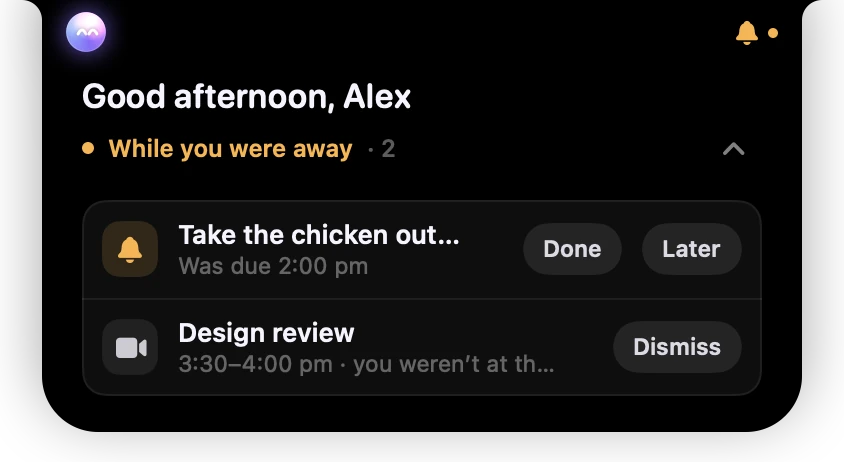
- 1The greeting heads the card.
- 2What went off while you were away, below it.
If reminders or meetings went off while you were away, they drop down when you’re back under "While you were away". The hello joins that card as its first line, so you see one card, not two. See Remind me.
Change it or turn it off
Go to Settings › Helping › Hellos:
- Say hello when I’m back: on or off.
- Wave now and then: Off, Now and then (twice a day), or More often (four times a day).
- Hello and Wave play one on your island now, so you can see what they look like.
What it uses
The greetings are picked on your Mac. A hello doesn’t look at your screen, doesn’t ask an AI model, and sends nothing anywhere. Your name is the one you gave in setup. Your next meeting comes from the calendars you already see in Today, and a birthday greeting only appears if you told Springle your birthday.
With Reduce Motion on (System Settings › Accessibility › Display), the face doesn’t hop or wave; the hello fades in and out.
Did this help?