Talk it through. It keeps up.
Press ⌃⌥Space and talk with Springle out loud. Ask, change your mind, add one more thing, and it gets on with it while you carry on talking.
A spoken conversation is Springle at its best. You start it once, then talk the way you would to someone sitting next to you. Springle answers out loud and works on what you asked while the two of you keep talking. You don’t hold anything down, so your hands stay free for what you’re doing.
Press all three together. Springle says hello and starts listening. Press them again to end it.
Start a conversation
- Press ⌃⌥ Space from any app.
- Or point at the island until it widens and click the microphone.
- Or click Springle’s face in the menu bar and choose Talk to Springle.
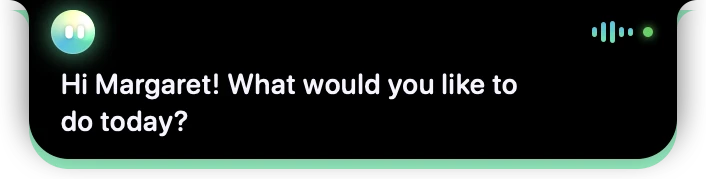
- 1Springle’s face. It’s green only while it’s really listening.
- 2The voice bars move with the sound. The small green dot means Springle can see your screen while it helps.
- 3What Springle says appears under the island as it says it.
Talking with Springle
Talk normally. Springle waits for a short pause before it answers (1.5 seconds unless you change it), because most people pause in the middle of a sentence. If it keeps answering before you’ve finished, give yourself more time in Settings › Voice › Listening › Pause before answering.
- Interrupt any time. Start talking and Springle goes quiet at once.
- Ask for several things. Ask for one thing, then add another, or change your mind halfway. You don’t need to wait for a task to finish before you say the next thing, and you don’t need to start a new conversation.
- Keep doing your own thing. You can move the mouse, scroll and look around while Springle works. It waits for your hand to settle before its next click.
Am I free on Thursday? Tell Priya yes.
Open my email and find the message from Sam
Actually, make that Friday
And remind me at five
Bigger jobs can go to Springbase, if you’ve linked it, and carry on there while you talk about something else.
Talking and typing together
You can type in the middle of a spoken conversation. Point at the island to open the card: the box at the bottom says "Type, or just talk". Type a web address, a name to spell, or anything you’d rather not say out loud, and press return.

- 1Springle’s face: the spoken conversation is still on while you type.
- 2Springle’s answer under the island. A web address shows as the site’s name.
The round button at the end of the box swaps between talking and typing without losing the conversation. While Springle listens it’s a green microphone: click it and the conversation carries on typed, with the microphone off. Click the microphone again to go back to talking. Replies follow how you asked: speak, and Springle speaks back; type, and the answer comes back written, without the voice.
Stopping
Any of these ends the conversation and turns the microphone off:
- Press ⌃⌥ Space again.
- Point at the island and click Stop, the square at the far right beside the notch.
- Click Springle’s face in the menu bar and choose Stop Springle.
Want Springle to pause a task without ending the conversation? Say "stop" or "wait". You can also press esc in the box. See Take over or stop.
The conversation also ends by itself after two quiet minutes (four while Springle is pointing at something for you), so the microphone never stays on by accident. Background noise like a television doesn’t count as talking.
If the island says Resting · just talk, Springle has gone quiet to save your talk time. Talk or type and it’s back in a second or so, with what you said passed on. Nothing is sent while it rests.
Talk time
Spoken conversations use your plan’s talk time, counted while the conversation is open. Holding ⌃⌥ and typing don’t use talk time; they count as asks instead.
When you’re close to the end of this month’s talk time, a line in the card says roughly how much is left, with Add 2 hours to buy more.
If talk time runs out in the middle of a conversation, Springle says so, finishes what it’s doing, and ends at the next quiet moment. After that, hold ⌃⌥ while you speak to keep asking: that doesn’t use talk time. More in Talk time.
Good to know
- Springle sends your voice only while someone is talking. The quiet between turns isn’t sent.
- If Springle hears itself through your speakers and keeps interrupting itself, turn on Settings › Voice › Listening › Stop listening while Springle talks, or use headphones.
- If your Mac locks or goes to sleep, the conversation stops, and doesn’t start again by itself when you come back.
Did this help?